My Mac mini setup was working, but it was not exactly ideal.
I had a dock under it already, and on paper it did the basics. It gave me a couple of USB-A ports on the front, SD and microSD card readers, and around back it added HDMI, audio, and a single USB-A connection. It also held an internal SSD for storage expansion, which was useful.
But the problem was simple. It did not give me enough flexibility.
For a machine as capable as the Mac mini, I wanted more connectivity, better use of USB-C, and a cleaner desk setup. That is where the UGREEN 11-in-1 USB-C docking station came in, and after living with it for a while, I can say it made a real difference.
What I wanted from a Mac mini dock
When you add a dock to a Mac mini, the goal is not just to pile on extra ports. It should actually improve the way the machine fits into your workflow.
For me, that meant a few things:
More port expansion without sacrificing existing connections
Built-in storage support for an M.2 NVMe SSD
A design that matches the Mac mini and sits neatly underneath it
Easy access to front-facing ports and card readers
A cleaner desktop with less clutter hanging off the back and sides
A lot of docks claim to do this, but the details matter. It is one thing to list a bunch of specs. It is another thing to make those ports useful in day to day use.
First impressions of the UGREEN 11-in-1 dock
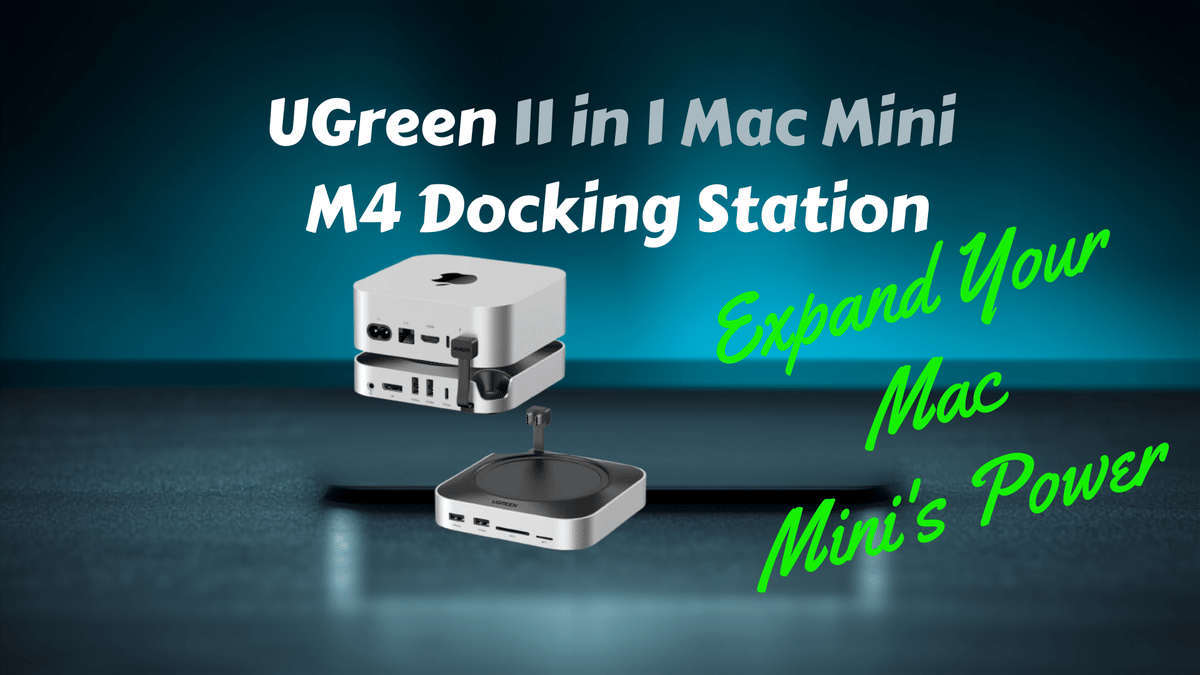
Right away, the format made sense. This dock is clearly shaped to work with the Mac mini, even if the packaging leans more toward broad USB-C compatibility.
It has the same tray-like top section that lets the Mac mini sit securely in place. It also includes a cutout so the power button remains accessible, which is one of those small details that matters more than people think.
Another smart touch is the built-in angled USB-C cable. That alone solves one of my biggest complaints with some compact docks.
On my previous dock, the connection to the Mac mini used up the dock’s only USB-C port. That means you were technically expanding your setup while also giving something up. It worked, but it was not a very efficient design.
The UGREEN dock handles that much better.
Port selection that actually feels like an upgrade
This is where the UGREEN dock really separates itself.
Compared to my previous setup, the expansion is a major step up.
Front ports
2 USB-A ports
SD card reader
microSD card reader
That is already familiar territory for a Mac mini dock, and it is a practical layout for quick access.
Rear ports
3 USB-C ports
3 USB-A ports
Built-in USB-C host connection to the Mac mini
That built-in host cable is the key detail. Because the cable is integrated into the dock, it does not consume one of the expansion ports. So instead of losing a USB-C port just to connect the dock itself, you keep all three rear USB-C ports available for actual accessories.
Once you add everything up, you are looking at:
5 USB-A ports total
3 USB-C ports total
SD and microSD card readers
An internal M.2 NVMe SSD slot
That is the kind of connectivity that can turn a Mac mini from a compact desktop into a much more serious workstation.
The built-in NVMe SSD slot is a huge bonus
One of the most useful features here is the M.2 NVMe SSD bay built into the bottom of the dock.
I was already using a 1TB SSD in my previous dock, so moving that storage over was an important part of the test. If the installation process felt cheap or awkward, it would have been a red flag.
Thankfully, that was not the case at all.
When I opened the dock to install the drive, the internal design left a very good impression. The SSD mounting area was well thought out, and the support for different SSD lengths was handled properly with solid brass inserts for the mounting screws.
That may sound like a small detail, but it speaks to the overall build quality. A lot of accessories look good from the outside and then feel flimsy once you open them up. This one did not.
The package also includes the tools you would expect for the SSD install, including a screwdriver and thermal material for the drive. That makes the whole setup more straightforward.
Real-world setup experience
Once the SSD was installed and the dock was in place under the Mac mini, the benefits became pretty obvious.
The Mac mini sits neatly on top, the dock stays planted, and the overall setup feels more refined than what I had before. The extra weight and solid construction help it feel stable rather than hollow or plasticky.
What I especially liked was being able to keep the front cleaner.
With my previous setup, the arrangement never felt quite as tidy. With the UGREEN dock, I was able to push most of my everyday connections to the back and leave the front mostly free except when I actually need quick access to USB-A or the card readers.
That makes the whole desk feel less cluttered, which is a big part of what a good dock should do.
Why the built-in USB-C connection matters so much
This deserves extra attention because it is one of the most practical design wins of the whole product.
Some docks advertise USB-C expansion, but then one of those ports has to be used just to connect the dock to the computer. In practice, that means you are not really getting the number of ports you thought you were getting.
Here, the integrated cable avoids that compromise.
You plug the dock into the Mac mini, and your actual expansion ports remain available for storage, peripherals, chargers, adapters, or whatever else your setup needs. It sounds simple, but it changes how useful the dock feels once everything is connected.
Build quality and design
UGREEN has built a strong reputation for making dependable accessories, and this dock fits right into that pattern.
What stood out to me most was:
Solid construction
Good weight and stability
Clean Mac mini-friendly form factor
Thoughtful internal SSD mounting design
Practical rear-heavy port layout for a tidier desk
It does not feel like a generic accessory trying to do too much. It feels like a product that was designed with an actual desktop setup in mind.
Who this dock is really for
If your Mac mini is mostly sitting there with a keyboard and mouse and you never connect anything else, this may be more than you need.
But if you want to build out a proper workstation, this kind of dock makes a lot of sense.
It is especially useful for anyone who needs:
More USB ports for accessories and peripherals
Dedicated USB-C expansion
Fast external storage in a cleaner integrated form
Quick access to SD and microSD cards
A more organized Mac mini desk setup
That combination of convenience, connectivity, and storage support is what pushes it beyond being just another add-on.
What impressed me most after using it
After spending some time with it, a few things stood out clearly.
The SSD bay is very well executed. Installing the drive felt easy and properly engineered.
The built-in host cable is a smart design choice. Keeping all three rear USB-C ports free makes the dock much more useful.
The port selection is practical. Five USB-A ports, three USB-C ports, and dual card readers cover a lot of ground.
It makes the setup cleaner. More of my cables can stay tucked away at the back.
The dock feels premium. The quality, fit, and finish are exactly what I want in a Mac mini accessory.
Final thoughts on the UGREEN Mac mini M4 11-in-1 USB-C docking station
This dock delivered exactly what I hoped it would. It added meaningful connectivity, gave me an integrated place for NVMe storage, and improved the overall layout of my Mac mini setup without making things more complicated.
That is the sweet spot for a desktop accessory like this.
The UGREEN 11-in-1 USB-C docking station is not just about adding more ports. It is about making the Mac mini more capable, more convenient, and more workstation-ready in everyday use.
If you have been looking for a way to make your Mac mini setup cleaner, faster, and more powerful, this is the kind of upgrade that can genuinely transform the experience.
Bottom line: for Mac mini users who want better connectivity, integrated M.2 NVMe SSD support, and a more polished desktop setup, this one gets a solid two thumbs up.