A USB-C cable is not just a USB-C cable anymore. Some are fine for charging a phone. Some can handle an external SSD. Some can run a display. Then you have cables like this Silkland USB4 cable that are trying to do all of it in one short, tough package.
This is the 3.3-foot Silkland USB4 cable rated for up to 80Gbps data bandwidth, up to 120Gbps of video bandwidth, and up to 240W USB Power Delivery charging. It is also listed as compatible with Thunderbolt 5, Thunderbolt 4, Thunderbolt 3, USB4, USB 3.2, and older USB standards.
That sounds like a lot for a little cable, so I put it into the kind of real-world situations that matter: charging a tablet and laptop, powering and carrying video from a USB camera, and moving a large file to and from an external SSD.
Key Takeaways
The Silkland cable is rated for 80Gbps data, 120Gbps video bandwidth, and up to 240W charging.
It charged both an iPad Pro and laptop reliably in real-world USB-C power delivery tests.
A 12.2GB file copied from SSD to laptop in 22.9 seconds and back in 26.1 seconds.
The cable feels unusually durable and well suited to travel, docks, SSDs, and camera gear.
What Comes in the Box
The package is simple. Inside, there is the cable and a multilingual manual. The manual describes this as a plug-and-play USB4 cable, with no special driver setup required.
Its stated specifications are serious:
Data bandwidth: Up to 80Gbps bidirectional transfer capability
Video bandwidth: Up to 120Gbps
Display support: Up to dual 8K displays or triple 4K displays at 144Hz, depending on the connected hardware
Charging: Up to 240W at 48V and 5A using USB PD 3.1
Compatibility: Thunderbolt 5, Thunderbolt 4, Thunderbolt 3, USB4, USB 3.2, USB 2.0, and more
There is one important reality check here. A cable cannot magically make a device faster than its ports, charger, SSD, dock, or display support. To get the maximum capability, the connected equipment has to support USB4 at the required bandwidth or Thunderbolt 5. Still, having one cable that is built for the higher-end standards gives you room to grow.
Build Quality: This Thing Feels Like a Brick
Right out of the package, the cable felt much tougher than an average charging cable. It is thicker, solid in the hand, and clearly meant for more than sitting on a bedside table.
Silkland claims it can handle lifting up to five pounds. I did not have a weight setup available to run a formal lift test, but after bending it, handling it roughly, and looking over the construction, this is one seriously tough cable. It feels like something that can live in a gear bag, get bent around chargers and adapters, and still keep moving.
That matters if you are constantly carrying a laptop, tablet, external drive, camera gear, docking station, and a mess of cables from place to place. Cables take abuse. This one feels ready for it.
Charging Test: Tablet and Laptop Power Delivery
For charging, I used a 300W UGREEN charging block with Thunderbolt-capable USB-C ports. First up was an iPad Pro sitting at about 75 percent battery.
The charger initially showed roughly 36W, then showed lower readings through another port. That is not a cable failure. Power delivery is negotiated between the charger and the device, so the device only pulls what it needs and what the charger port can provide at that moment.
I then connected a laptop. In that setup, charging held around 60W, moving through readings around 50W to 64W. The laptop was charging normally with no issue.
That is the main point: even though the cable is rated for up to 240W, the actual wattage depends on the device, the charger, the selected charger port, battery level, and the power profile they negotiate. In this test, the cable handled the laptop load consistently and without any drama.
Power and Video Over One USB-C Connection
Next, I connected an Airstream camera to the laptop through the Silkland cable. This camera is battery powered, but it needs USB-C for both power and video transmission when operating in this kind of setup.
The cable powered the camera and sent the image to the laptop at the same time. That is exactly the kind of all-in-one functionality that makes a higher-spec USB4 cable useful. Instead of carrying one cable for power and another for data, a single USB-C connection handled both jobs.
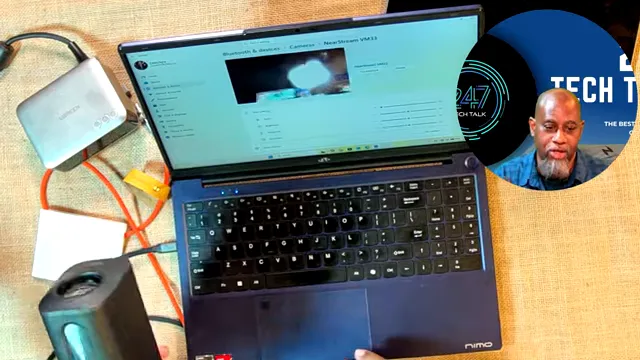
The USB-C connection powered the camera while carrying its video feed to the laptop.
I did not run a full 8K display test because my current setup is based on HDMI rather than USB-C video output. So I cannot personally verify the cable's maximum display claims. What I can say is that the real-world camera connection worked, with power and video moving over the same cable.
Real-World SSD File Transfer Test
For the data transfer test, I used a 250GB SSK USB SSD and a 12.2GB file. This was not a synthetic benchmark or an 80Gbps lab test. It was a practical test: copy a large file from the SSD to the laptop, then copy it back again.
First, I copied the 12.2GB file from the external SSD to the laptop's internal drive. The transfer completed in 22.9 seconds.
Then I deleted the original from the SSD and copied the same file from the laptop back to the external drive. That transfer took 26.1 seconds.
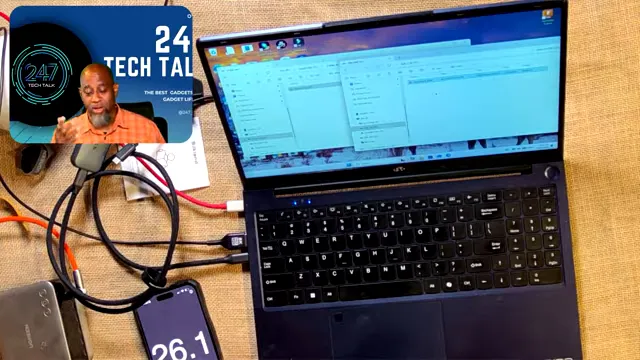
The 12.2GB laptop-to-SSD transfer finished in 26.1 seconds during the real-world copy test.
Those results are close enough to show that the cable handled traffic in both directions well. The slight difference makes sense because a copy test includes more than the cable itself. The external SSD, internal drive, USB controller, operating system, cache behavior, and the moment the computer starts the copy all affect the final time.
What matters is that both directions were fast and consistent:
SSD to laptop: 12.2GB in 22.9 seconds
Laptop to SSD: 12.2GB in 26.1 seconds
This does not prove the full 80Gbps rating, because the SSD and laptop setup are likely the bottleneck long before the cable reaches its ceiling. But it does prove something useful: the cable did not get in the way of a fast external SSD workflow.
Who This Cable Makes Sense For
This is not the cable I would buy just to charge a basic phone overnight. It is more cable than that job needs.
It makes sense for people who want one durable USB-C cable in the bag for several different jobs:
Charging a tablet, laptop, or higher-power USB-C device
Connecting a fast external SSD for file transfers
Running a USB-C dock or Thunderbolt setup
Powering USB-C cameras and accessories while transferring data
Preparing for newer USB4 and Thunderbolt 5 hardware
Replacing weaker cables that get crushed, bent, and damaged during travel
The short length is also a benefit for certain setups. At roughly three feet, it is long enough to connect a laptop to a dock, charger, drive, or nearby device without leaving a pile of extra cable all over the desk.
Final Verdict
For what this Silkland USB4 cable costs, what it is rated to do, and how solid it feels, I have to give it two thumbs up.
It charged the iPad Pro and laptop without problems. It powered a camera while transferring video to the laptop. It moved a 12.2GB file in roughly 23 to 26 seconds depending on direction. And most importantly for a cable that will live in a gear bag, it feels built to take a beating.
I could not test the full 8K display capability or prove the maximum 80Gbps and 120Gbps specifications in this setup. But based on the real-world charging, camera, and SSD tests, this is a capable, heavy-duty USB-C cable that can handle far more than the average cable.
If you need a durable all-purpose cable for power, video, and high-speed data, you can check the current listing for the Silkland 80Gbps USB4 cable.