ELEPHAS Roku TV Projector Review: A Big-Screen Setup That Replaces Your TV?
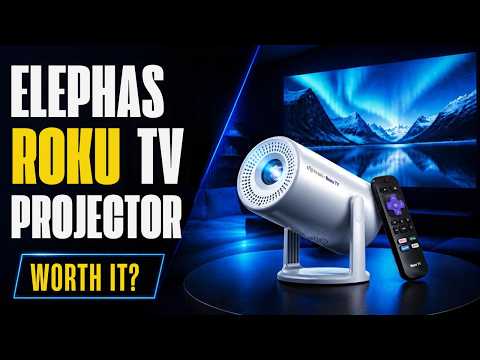
Looking for a TV replacement that doesn’t require wall mounting a bulky display? The ELEPHAS Roku TV Projector might be the compact, versatile solution you’ve been searching for. This smart projector combines built-in Roku functionality with practical features designed for small spaces and flexible viewing setups. Here’s everything you need to know about whether this projector deserves a spot in your home.
What’s in the Box
The ELEPHAS Roku TV Projector arrives with a surprisingly minimal package. Inside, you’ll find:
- The projector unit itself
- Remote control with Roku integration
- Power adapter
- Quick start guide with QR code for registration
The straightforward unboxing suggests this device prioritizes simplicity. Unlike many projectors that require extensive setup, the ELEPHAS comes ready to go with integrated Roku OS, meaning you won’t need external streaming devices or complicated installations.
Key Specifications and Features
The ELEPHAS Roku TV Projector presents an interesting feature set at its price point:
- Resolution: 720p (note: most competitors now offer 1080p as standard)
- Brightness: 150 lumens
- Built-in OS: Roku TV with full app ecosystem
- Connectivity: HDMI, USB-A, Bluetooth, Wi-Fi
- Audio: Dolby Audio support with built-in speakers
- Smart Features: Apple AirPlay, Apple Home, Amazon Alexa, Google Home compatibility
- Automatic Correction: Vertical keystone correction
- Mount Options: 1/4-inch mounting thread for tripods and ceiling installations
Design and Build Quality
The projector features a clean, rectangular design that prioritizes portability without sacrificing mounting flexibility. The chassis feels solid, and the inclusion of a 1/4-inch mounting thread makes it compatible with standard camera tripods and professional projector mounts. This flexibility is particularly valuable for renters or anyone who doesn’t want permanent installations.
The rear panel houses all the connectivity options you’ll need, including HDMI for external devices, USB-A for media playback from flash drives, and separate reset and power buttons. The focus adjustment knob sits conveniently on top for easy access during setup.
Setup and Initial Configuration
Getting the ELEPHAS up and running proved straightforward but revealed a minor quirk. During Wi-Fi setup, the projector initially failed to detect a nearby 2.4GHz network despite it being the strongest available signal. This required manual network selection, a small but worth-noting inconvenience during first-time setup.
Once connected, the device automatically downloaded and installed software updates—multiple iterations, in fact—which completed relatively quickly. The Roku activation process uses QR codes for simplified account linking, though existing Roku users may want to note that app accounts and parental controls tied to your existing Roku profile will carry over to this device.
Performance in Real-World Use
Video Quality
Testing the projector revealed solid performance within its specifications. The 720p resolution delivers clear, watchable images in darkened rooms. While the reviewer noted a preference for 1080p or even 4K, the image quality at 720p proves adequate for smaller viewing spaces. The automatic keystone correction works effectively, ensuring images display straight regardless of projector placement or ceiling angles.
The rectangular aspect ratio works well for modern content, and the color representation appears balanced across various streaming sources. Most importantly, for a projector in this price range, the image quality doesn’t feel like a compromise—it feels like a practical choice for the target use case.
Audio Performance
The built-in speaker delivers serviceable audio but won’t replace a quality sound system. The sound comes across as somewhat tinny and lacks the depth many users prefer for regular viewing. However, the inclusion of Bluetooth audio support and audio output options changes this limitation from a dealbreaker to a minor inconvenience.
Connecting wireless Bluetooth speakers or headphones transforms the audio experience entirely, and the ability to plug external speakers into the audio output jack provides maximum flexibility for different room setups.
Roku Integration: The Game Changer
What truly sets the ELEPHAS apart is its integrated Roku TV platform. This isn’t a projector with Roku as an afterthought—it’s a complete streaming television replacement with access to the entire Roku ecosystem. This means:
- Thousands of streaming apps already available
- Regular software updates and improvements
- Unified account ecosystem if you already own Roku devices
- Parental controls and content restrictions for family use
- Responsive remote interface optimized for hands-free content discovery
For the reviewer’s use case—setting up a viewing option in his son’s bedroom—this integration proves invaluable. The child-friendly Roku Kids interface provides appropriate content filtering, and parental controls offer peace of mind.
Who Should Buy This Projector?
The ELEPHAS Roku TV Projector excels in specific scenarios:
Ideal Users:
- Renters who can’t mount TVs but want large-screen viewing
- Parents setting up secondary room entertainment for children
- Anyone furnishing rooms with angled or sloped ceilings
- College students seeking compact dorm room solutions
- Those wanting privacy-focused viewing with Bluetooth headphone support
- Homeowners planning projector-and-motorized-screen installations
Less Suitable For:
- Users demanding 1080p or 4K resolution
- Those prioritizing premium audio from internal speakers
- Bright room environments (150 lumens requires darkness)
- Anyone needing cutting-edge performance specs
Versatility and Mounting Options
Perhaps the ELEPHAS’s greatest strength lies in its adaptability. The integrated 1/4-inch tripod mount means you can:
- Position it on a tabletop using a standard tripod
- Mount it on a ceiling using a professional projector mount
- Rotate and flip the image for front or rear projection scenarios
- Use the automatic keystone correction to accommodate non-perpendicular mounting angles
This flexibility translates to real-world advantages. The reviewer plans to install the ELEPHAS in his son’s room with a motorized projection screen and ceiling mount—a setup that would be impossible with a traditional television but straightforward with this projector.
The Verdict
The ELEPHAS Roku TV Projector delivers impressive versatility for a device in its price range. Yes, the 720p resolution would be better as 1080p, and yes, the built-in speakers lack depth—but neither limitation represents a dealbreaker for the projector’s intended purpose.
What matters is that you get a complete streaming solution with Roku’s proven platform, flexible mounting options, solid image quality in dark rooms, and the ability to disappear completely when powered off. For small spaces, renters, or anyone wanting to replace traditional TV setups with something more adaptable, the ELEPHAS offers genuine value.
The projector shines brightest as a creative solution to viewing in rooms where standard televisions simply won’t fit—whether due to space constraints, mounting limitations, or architectural challenges. Pair it with a quality external speaker system and a motorized projection screen, and you’ve created a viewing experience that rivals traditional setups while offering unprecedented flexibility.
Final Recommendations
If you’re considering the ELEPHAS Roku TV Projector, invest in quality external audio from the start. The 150-lumen brightness demands a properly darkened room, so consider your viewing environment carefully. And if ceiling mounting appeals to you, the automatic image flip and keystone correction make installation significantly easier than with many competitor projectors.
For the price, this projector punches well above its weight in terms of practical utility and versatility. While it may not replace a high-end projector setup for cinephiles, it absolutely can replace a television for anyone willing to embrace a different form factor.
Discover more from 247 Tech Talk
Subscribe to get the latest posts sent to your email.